
Documentation
VT Planner Building Demand Model Guide
Learn how building type, entrance bias, basements, and population shape elevator traffic demand for VT Planner calculations, simulations, and reports.
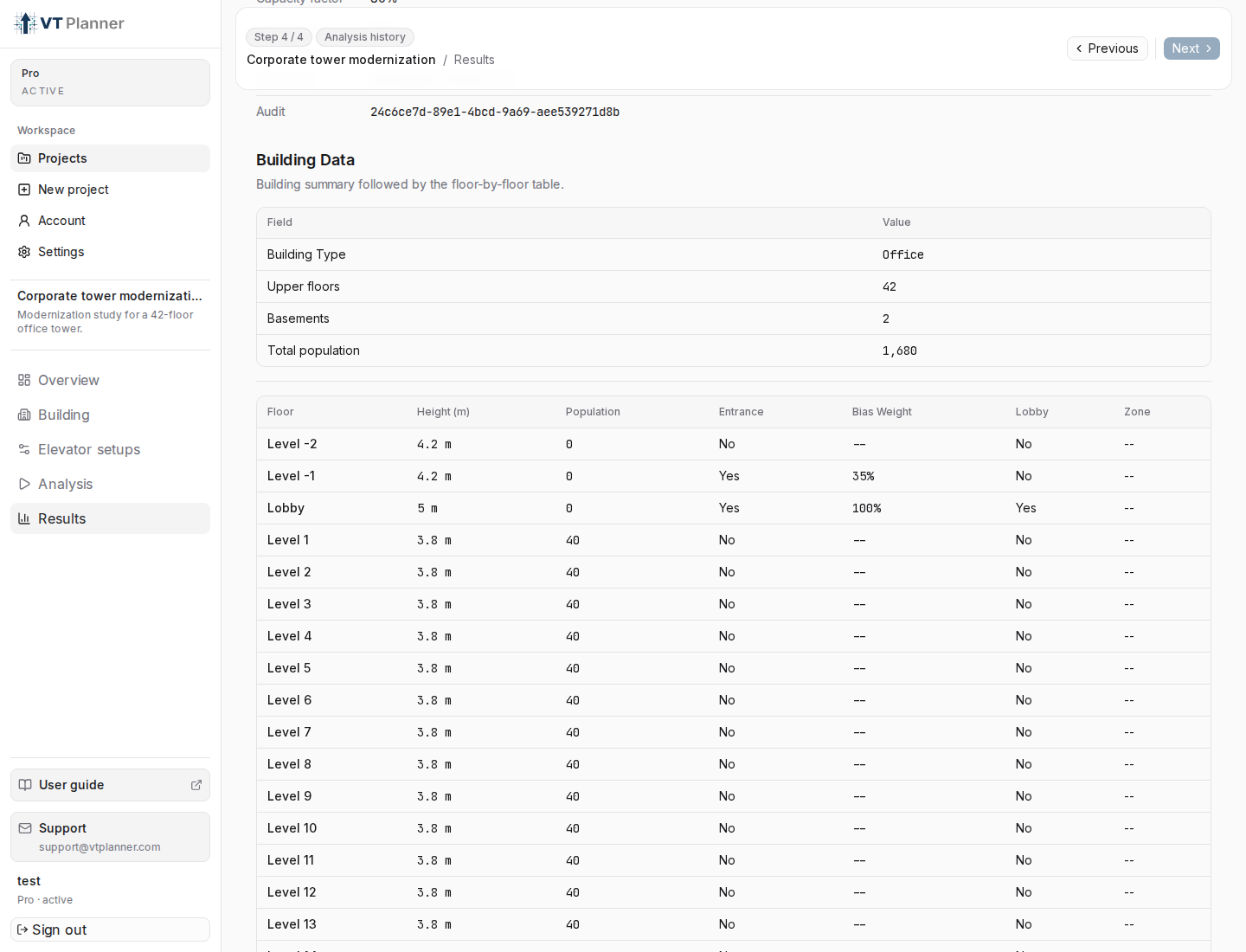
The Building tab is not only geometry. It defines the demand model that VT Planner later uses for calculations, simulations, reports, and validation.
The important idea is that the building answers four questions before any elevator setup is evaluated:
| Question | Where it is configured |
|---|---|
| What kind of demand should be assumed? | Building type and the selected traffic pattern or calculation method. |
| Where can passengers enter or exit? | Entrance checkboxes in the floor table. |
| How important is each entrance? | Bias values for selected entrance floors. |
| Where is population located? | Population by floor, either uniform or custom. |
Building Type Is a Demand Input
Building type should be selected as the dominant operational use of the building, not as a cosmetic label. VT Planner uses it when resolving built-in demand profiles.
For example, VT Planner resolves Office and Residential differently in Up-peak:
| Building type and pattern | Resolved demand |
|---|---|
Office + Up-peak |
14% of population incoming per 5 minutes. |
Residential + Up-peak |
7.5% of population incoming per 5 minutes. |
Other built-in Up-peak cases |
12% of population incoming per 5 minutes. |
This means that two identical elevator groups can produce different demand, arrival rates, handling capacity comparisons, and simulation outcomes if the building type changes.
Entrances
An entrance floor is a floor where passengers can enter or leave the building. The main lobby is the common case, but VT Planner also supports multiple entrances, such as:
- a basement parking level;
- a podium or street entrance on another level;
- a transit connection;
- a sky lobby or transfer lobby when it is modeled as an entry or exit point.
In the floor table, mark each entrance with the Entrance checkbox. VT Planner validates that entrance floors are inside the served building range.
For most project workflows, the main lobby should remain selected. Additional entrances should be added only when they represent real external access or a deliberate modeling assumption.
Bias
Bias is a relative weight for entrance demand. It does not need to sum to 1. VT Planner normalizes the selected entrance weights internally.
Example:
| Entrance floor | Bias | Interpretation |
|---|---|---|
0 main lobby |
1.0 |
Reference entrance weight. |
-1 basement parking |
0.35 |
Receives about 35% of the lobby entrance weight. |
2 podium entrance |
2.0 |
Receives twice the weight of an entrance with bias 1.0. |
Bias values must be positive and must reference selected entrance floors. If a floor is not marked as an entrance, it should not have a bias value.
Bias is an entrance access assumption. It is related to the broader elevator traffic concept of demand bias, where specific floors or destinations can attract more traffic than their population alone would suggest.
Population Distribution
Population controls where demand can originate or terminate. In a uniform model, VT Planner distributes population across occupied non-lobby floors. In a custom model, the entered floor populations define which floors are occupied and how much weight they carry.
The main lobby population remains zero in the building form. Lobby traffic is produced through entrance floors and traffic patterns, not by assigning lobby occupants.
When Population distribution is Custom, floors with zero population may still be physically served, but they do not represent occupied destination demand in the same way as populated floors.
Calculation Implications
Calculation has two different paths:
| Calculation method | Demand behavior |
|---|---|
Up-peak |
Uses the simple up-peak analytical model. It expects the default lobby entrance. |
Down-peak |
Uses the simple down-peak analytical model. It expects the default lobby entrance. |
General analysis |
Supports incoming, outgoing, and interfloor shares, multiple entrance floors, basement entrances, and simple zoning without explicit transfer floors. |
If the project has multiple entrances, basement entrance demand, or a traffic mix that is not a pure up-peak or down-peak case, use General analysis for analytical sizing.
In General analysis, the Incoming share, Outgoing share, and Interfloor share values are shares of the analysis mix. They must sum to 1.0.
The simple analytical methods are best understood as focused sizing checks for a normal group scenario: one main entrance, one dominant direction, and no explicit transfer itinerary. They are useful because they keep the demand model narrow and make RTT, Interval, and Handling capacity easy to compare.
General analysis keeps the speed of analytical sizing, but widens the demand model. It lets one run combine incoming, outgoing, and interfloor components, distribute entrance-based demand across more than one entrance floor, and account for simple service zones without configured transfer floors. The result is still analytical, not a time-based simulation, so it should not be used to evaluate transfer waiting or stochastic queue behavior.
Simulation Implications
Simulation uses entrance floors and entrance bias for passenger generation across the active traffic pattern:
Up-peak: passengers start at entrance floors and travel to occupied floors.Down-peak: passengers start at occupied floors and travel to entrance floors.Interfloor: passengers move between occupied floors.Mixed,Midday / Lunch, andCustom: passenger generation can include incoming, outgoing, and interfloor components.
The Demand used indicator in Analysis shows the resolved demand split before launch. Use it as a final check that the selected building type, traffic pattern, and custom demand assumptions match the scenario you intend to run.
Practical Checklist
- Select
Building typebased on actual operating demand, not only architectural use. - Mark every real external access floor as an
Entrance. - Set
Biasvalues as relative entrance weights. - Use custom population if specific floors have materially different occupancy.
- Use
General analysiswhen calculation needs multiple entrances, mixed traffic, basements, or simple zoning. - Before simulation, confirm the
Demand usedvalues inAnalysis.